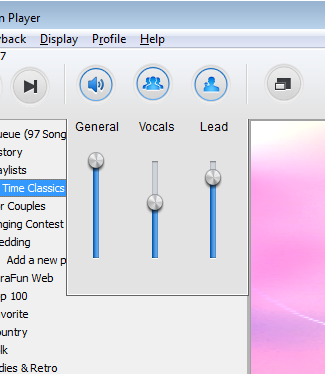
If available, you have the option to add / remove, or change the volume of the backing vocals.
In order to do so, follow these steps:
- Open the songs you want to sing
- Drag your mouse onto the icons on top to display the volume mixer
- Click on the group icon to turn on / off the backing vocals, or move the slider to change the volume.
And if you are wanting to set default vocals (lead and background), go to the menu bar > File > Preferences > Vocals.

3 comments
vsguevara
KaraFun
johnnyauyeung88
dreajay
KaraFun